NiGui
=====
NiGui is a cross-platform desktop GUI toolkit written in [Nim](https://nim-lang.org/).
NiGui provides an easy way to develop applications in Nim with a full-featured graphical user interface.
Target platforms:
* Windows (Win32 API)
* Linux over GTK+ 3
* macOS over GTK+ 3 (native support planned)
Design goals:
* **Full abstraction**
NiGui provides full abstraction of the underlying platform. NiGui applications are written once and can be compiled for different platforms. Application developers don't have to care about platform-specific details.
* **Simple and elegant**
NiGui has a clean and beginner-friendly high-level API. It is much less complex than the Win32 API, GTK+ or Qt.
NiGui profits of Nim's features and elegance in contrast to C code, for example Nim's polymorphism capabilities.
* **Powerful**
NiGui uses the native controls of the underlying platform to give a familiar use and feel for the user. In addtion, NiGui allows to create custom controls for special use cases or a themed UI.
NiGui has it's own layout manager for automatic resizing and positioning of controls.
* **Minimal dependencies**
The NiGui source code has no dependencies except Nim's standard library. Platform bindings are included.
Generated binaries (exe files) include NiGui and do not need external libraries.
Screenshots
-------------
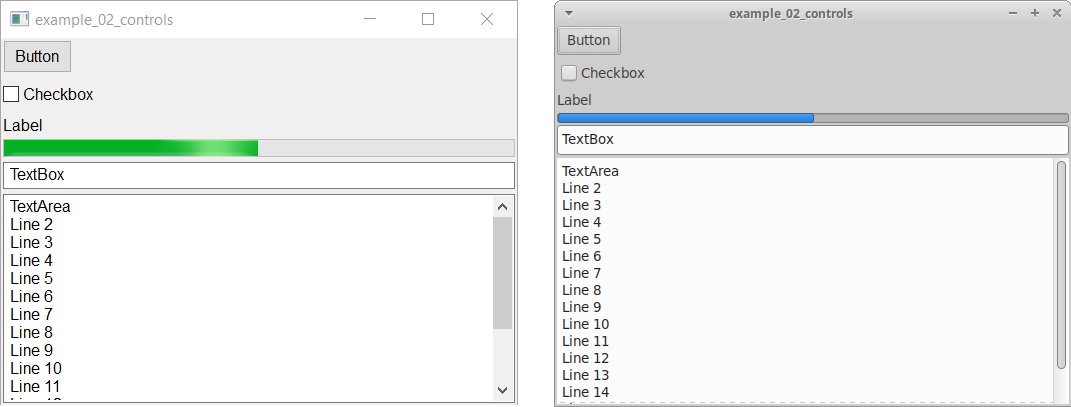
Example program with native controls running under Windows 10 and Xubuntu:
 Current state
-------------
NiGui is currently work in progress. Very basic things work, many things are missing.
Working:
* Window, Button, Label, TextBox, TextArea
* LayoutContainer (own layout manager)
* Timers
* Message boxes and file dialogs
* Custom controls including scrolling
* Drawing and image processing
WIP:
* Event handling
* Documentation
Planned:
* macOS support
* More widgets
Getting started
---------------
### How to install NiGui manually
1. Clone the NiGui repository with Git or download the source code
2. Add the following line to one of your [Nim configuration files](https://nim-lang.org/docs/nimc.html#compiler-usage-configuration-files):
Current state
-------------
NiGui is currently work in progress. Very basic things work, many things are missing.
Working:
* Window, Button, Label, TextBox, TextArea
* LayoutContainer (own layout manager)
* Timers
* Message boxes and file dialogs
* Custom controls including scrolling
* Drawing and image processing
WIP:
* Event handling
* Documentation
Planned:
* macOS support
* More widgets
Getting started
---------------
### How to install NiGui manually
1. Clone the NiGui repository with Git or download the source code
2. Add the following line to one of your [Nim configuration files](https://nim-lang.org/docs/nimc.html#compiler-usage-configuration-files):
`--path:"/src"`
### How to install NiGui with Nimble
Run the [Nimble](https://github.com/nim-lang/nimble) install command: `$ nimble install nigui`
### Additional configuration
* To disable the command line window under Windows, add this line to your Nim configuration: `--app:gui`
* To compile a Windows binary which uses Gtk, add this line to your Nim configuration: `-d:forceGtk`
### How to verify the installation
Compile and run one of the included example programs.
Show cases
----------
* [NiCalc](https://github.com/trustable-code/NiCalc) - Simple calculator
* [Gravitate](https://www.qtrac.eu/gravitate.html) - Samegame/tilefall-like game
Contributing
------------
You can help to improve NiGui by:
* Trying to use it and giving feedback
* Test the programs under different Windows versions or Linux distributions
* Developing show cases
* Help improving and extending the code
* Adding macOS support
Contact: see https://github.com/trustable-code
FAQ
---
[FAQ](faq.md)
License
-------
NiGui is FLOSS (free and open-source software).
All files in this repository are licensed under the [MIT License](https://opensource.org/licenses/MIT). As a result you may use any compatible license (essentially any license) for your own programs developed with NiGui. You are explicitly permitted to develop commercial applications using NiGui.
Copyright 2017-2020 Simon Krauter and contributors
