In order to ensure that the description field of the outer layer is as simple and secure as possible, it is generally not recommended to use the interface and module operation api in this domain. Therefore, most module interfaces can only be used in the script domain to implement complex functions. Of course, a small number of read-only built-in interfaces can still be used in the description field, as shown in the following table:
| Interface | Description | Available Domains | Supported Versions | | ----------------------------------------------- | -------------------------------------------- | -------------------------- | -------- | | [val](#val) | Get the value of the built-in variable | Script Field | >= 2.1.5 | | [import](#import) | Importing Extension Blocks | Script Fields | >= 2.0.1 | | [inherit](#inherit) | Import and inherit base class modules | Script Domain | >= 2.0.1 | | [ifelse](#ifelse) | Similar ternary conditional judgment | Description field, script field | >= 2.0.1 | | [try-catch-finally](#try-catch-finally) | Exception Capture | Script Field | >= 2.0.1 | | [pairs](#pairs) | Used to Traverse the Dictionary | Description Field, Script Field | >= 2.0.1 | | [ipairs](#ipairs) | Used to traverse arrays | Description fields, script fields | >= 2.0.1 | | [print](#print) | Wrap Print Terminal Log | Description Field, Script Field | >= 2.0.1 | | [printf](#printf) | No Line Printing Terminal Log | Script Field | >= 2.0.1 | | [cprint](#cprint) | Wrap Color Print Terminal Log | Script Field | >= 2.0.1 | | [cprintf](#cprintf) | No Line Color Print Terminal Log | Script Field | >= 2.0.1 | | [format](#format) | Format String | Description Field, Script Field | >= 2.0.1 | | [vformat](#vformat) | Format string, support for built-in variable escaping | Script Domain | >= 2.0.1 | | [raise](#raise) | Throwing an abort program | Script Field | >= 2.0.1 | | [os](#os) | System Operation Module | Partial Read-Only Operation Description Field, Script Field | >= 2.0.1 | | [io](#io) | File Manipulation Module | Script Field | >= 2.0.1 | | [path](#path) | Path Manipulation Module | Description Field, Script Field | = 2.0.1 | | [table](#table) | Array and Dictionary Operations Module | Description Field, Script Field | >= 2.0.1 | | [string](#string) | String Manipulation Module | Description Field, Script Field | >= 2.0.1 | | [process](#process) | Process Operation Module | Script Field | >= 2.0.1 | | [coroutine](#coroutine) | Coroutine Operation Module | Script Field | >= 2.0.1 | | [find_packages](#find_packages) | Find Dependency Packages | Script Fields | >= 2.2.5 | An example of using an interface call in a description field is as follows, generally only for conditional control: ```lua -- Scan all subdirectories under the current xmake.lua directory, defining a task task with the name of each directory for _, taskname in ipairs(os.dirs("*"), path.basename) do task(taskname) on_run(function () end) end ``` The script field and description field mentioned above mainly refer to: ```lua -- Description field target("test") -- Description field set_kind("static") add_files("src/*.c") on_run(function (target) -- Script domain end) -- Description field ``` ### val #### Get the value of the built-in variable [Built-in variables](/manual/builtin_variables) can be obtained directly through this interface, without the need to add a `$()` package, which is much simpler to use, for example: ```lua print(val("host")) print(val("env PATH")) local s = val("shell echo hello") ``` Using [vformat](#vformat) is cumbersome: ```lua local s = vformat("$(shell echo hello)") ``` However, `vformat` supports string parameter formatting, which is more powerful, so the application scenario is different. ### import #### Importing extension blocks Import is mainly used to import xmake's extension class library and some custom class library modules, generally used to: * Custom script ([on_build](/manual/project_target?id=targeton_build), [on_run](/manual/project_target?id=targeton_run) ..) * Plugin development * Template development * Platform extension * Custom task task The import mechanism is as follows: 1. Import from the current script directory first 2. Import from the extended class library Imported grammar rules: Class library path rules based on `.`, for example: Import core core extension module ```lua import("core.base.option") import("core.project") import("core.base.task") -- 2.1.5 Previously core.project.task import("core") function main() -- Get parameter options print(option.get("version")) -- Run tasks and plugins task.run("hello") project.task.run("hello") core.base.task.run("hello") end ``` Import the custom module in the current directory: Directory Structure: ``` Plugin - xmake.lua - main.lua - modules - hello1.lua - hello2.lua ``` Import modules in main.lua ```lua import("modules.hello1") import("modules.hello2") ``` After importing, you can directly use all the public interfaces inside. The private interface is marked with the `_` prefix, indicating that it will not be exported and will not be called externally. . In addition to the current directory, we can also import libraries in other specified directories, for example: ```lua import("hello3", {rootdir = "/home/xxx/modules"}) ``` To prevent naming conflicts, you can also specify an alias after import: ```lua import("core.platform.platform", {alias = "p"}) function main() -- So we can use p to call the plats interface of the platform module to get a list of all the platforms supported by xmake. utils.dump(p.plats()) end ``` Import can not only import the class library, but also import and import as inheritance, realize the inheritance relationship between modules. ```lua import("xxx.xxx", {inherit = true}) ``` This is not a reference to the module, but all the public interfaces of the module imported, so that it will be merged with the interface of the current module to achieve inheritance between modules. Version 2.1.5 adds two new properties: `import("xxx.xxx", {try = true, anonymous = true}). If the try is true, the imported module does not exist, only return nil, and will not interrupt xmake after throwing an exception. If anonymous is true, the imported module will not introduce the current scope, only the imported object reference will be returned in the import interface. ### inherit #### Import and inherit base class modules This is equivalent to the `inherit` mode of the [import](#import) interface, which is: ```lua import("xxx.xxx", {inherit = true}) ``` With the `inherit` interface, it will be more concise: ```lu Inherit("xxx.xxx") ``` For an example, see the script in the xmake tools directory: [clang.lua](#https://github.com/xmake-io/xmake/blob/master/xmake/tools/clang.lua) This is part of the clang tool module that inherits gcc. ### ifelse #### Similar to the ternary condition judgment Since lua does not have a built-in ternary operator, a more concise conditional choice is achieved by encapsulating the `ifelse` interface: ```lua local ok = ifelse(a == 0, "ok", "no") ``` ### try-catch-finally #### Exception capture Lua native does not provide try-catch syntax to catch exception handling, but provides interfaces such as `pcall/xpcall` to execute lua functions in protected mode. Therefore, the capture mechanism of the try-catch block can be implemented by encapsulating these two interfaces. We can look at the packaged try-catch usage first: ```lua try { -- try code block function () error("error message") end, -- catch code block catch { -- After an exception occurs, it is executed function (errors) print(errors) end } } ``` In the above code, an exception is thrown inside the try block, and an error message is thrown, caught in the catch, and the error message is output. And finally processing, this role is for the `try{}` code block, regardless of whether the execution is successful, will be executed into the finally block In other words, in fact, the above implementation, the complete support syntax is: `try-catch-finally` mode, where catch and finally are optional, according to their actual needs. E.g: ```lua try { -- try code block function () error("error message") end, -- catch code block catch { -- After an exception occurs, it is executed function (errors) print(errors) end }, -- finally block finally { -- Finally will be executed here function (ok, errors) -- If there is an exception in try{}, ok is true, errors is the error message, otherwise it is false, and error is the return value in try end } } ``` Or only the finally block: ```lua try { -- try code block function () return "info" end, -- finally block finally { -- Since there is no exception in this try code, ok is true and errors is the return value: "info" function (ok, errors) end } } ``` Processing can get the normal return value in try in finally, in fact, in the case of only try, you can also get the return value: ```lua -- If no exception occurs, result is the return value: "xxxx", otherwise nil local result = try { function () return "xxxx" end } ``` In xmake's custom scripting and plugin development, it is also based entirely on this exception catching mechanism. This makes the development of the extended script very succinct and readable, eliminating the cumbersome `if err ~= nil then` return value judgment. When an error occurs, xmake will directly throw an exception to interrupt, and then highlight the detailed error. information. E.g: ```lua target("test") set_kind("binary") add_files("src/*.c") -- After the ios program is compiled, the target program is ldid signed after_build(function (target)) os.run("ldid -S %s", target:targetfile()) end ``` Only one line `os.run` is needed, and there is no need to return a value to determine whether it runs successfully. After the operation fails, xmake will automatically throw an exception, interrupt the program and prompt the error. If you want to run xmake without running interrupts directly after running, you can do it yourself.Add a try and you will be fine: ```lua target("test") set_kind("binary") add_files("src/*.c") after_build(function (target)) try { function () os.run("ldid -S %s", target:targetfile()) end } end ``` If you want to capture the error message, you can add a catch: ```lua target("test") set_kind("binary") add_files("src/*.c") after_build(function (target)) try { function () os.run("ldid -S %s", target:targetfile()) end, catch { function (errors) print(errors) end } } end ``` However, in general, write custom scripts in xmake, do not need to manually add try-catch, directly call a variety of api, after the error, let xmake default handler to take over, directly interrupted. . ### pairs #### Used to traverse the dictionary This is lua's native built-in api. In xmake, it has been extended in its original behavior to simplify some of the daily lua traversal code. First look at the default native notation: ```lua local t = {a = "a", b = "b", c = "c", d = "d", e = "e", f = "f"} for key, val in pairs(t) do print("%s: %s", key, val) end ``` This is sufficient for normal traversal operations, but if we get the uppercase for each of the elements it traverses, we can write: ```lua for key, val in pairs(t, function (v) return v:upper() end) do print("%s: %s", key, val) end ``` Even pass in some parameters to the second `function`, for example: ```lua for key, val in pairs(t, function (v, a, b) return v:upper() .. a .. b end, "a", "b") do print("%s: %s", key, val) end ``` ### ipairs #### for traversing arrays This is lua's native built-in api. In xmake, it has been extended in its original behavior to simplify some of the daily lua traversal code. First look at the default native notation: ```lua for idx, val in ipairs({"a", "b", "c", "d", "e", "f"}) do print("%d %s", idx, val) end ``` The extension is written like the [pairs](#pairs) interface, for example: ```lua for idx, val in ipairs({"a", "b", "c", "d", "e", "f"}, function (v) return v:upper() end) do print("%d %s", idx, val) end for idx, val in ipairs({"a", "b", "c", "d", "e", "f"}, function (v, a, b) return v:upper() .. a .. b end, "a", "b") do print("%d %s", idx, val) end ``` This simplifies the logic of the `for` block code. For example, if I want to traverse the specified directory and get the file name, but not including the path, I can simplify the writing by this extension: ```lua for _, filename in ipairs(os.dirs("*"), path.filename) do -- ... end ``` ### print #### Wrapping print terminal log This interface is also the native interface of lua. xmake is also extended based on the original behavior, and supports: formatted output, multivariable output. First look at the way native support: ```lua print("hello xmake!") print("hello", "xmake!", 123) ``` And also supports extended formatting: ```lua print("hello %s!", "xmake") print("hello xmake! %d", 123) ``` Xmake will support both types of writing at the same time, and the internal will automatically detect and select the output behavior. ### printf #### No line printing terminal log Like the [print](#print) interface, the only difference is that it doesn't wrap. ### cprint #### Wrap color print terminal log The behavior is similar to [print](#print), the difference is that this interface also supports color terminal output, and supports `emoji` character output. E.g: ```lua cprint('${bright}hello xmake') cprint('${red}hello xmake') cprint('${bright green}hello ${clear}xmake') cprint('${blue onyellow underline}hello xmake${clear}') cprint('${red}hello ${magenta}xmake') cprint('${cyan}hello ${dim yellow}xmake') ``` The results are as follows: 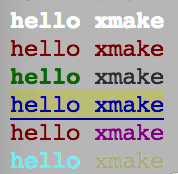 The color-related descriptions are placed in `${ }`, and you can set several different properties at the same time, for example: ``` ${bright red underline onyellow} ``` Indicates: highlighted red, background yellow, and with a down line All of these descriptions will affect the entire entire line of characters. If you only want to display partial color text, you can insert `${clear}` at the end position to clear the previous color description. E.g: ``` ${red}hello ${clear}xmake ``` In this case, only hello is displayed in red, and the others are still normal black display. Other colors belong to, I will not introduce them here, directly paste the list of attributes in the xmake code: ```lua colors.keys = { -- Attributes reset = 0 -- reset attribute , clear = 0 -- clear attribute , default = 0 -- default property , bright = 1 -- highlight , dim = 2 -- dark , underline = 4 -- underline , blink = 5 -- flashing , reverse = 7 -- reverse color , hidden = 8 -- hidden text -- Foreground , black = 30 , red = 31 , green = 32 , yellow = 33 , blue = 34 , magenta = 35 , cyan = 36 , white = 37 -- Background color , onblack = 40 , onred = 41 , ongreen = 42 , onyellow = 43 , onblue = 44 , onmagenta = 45 , oncyan = 46 , onwhite = 47 ``` In addition to color highlighting, if your terminal is under macosx, lion above the system, xmake can also support the display of emoji expressions, for systems that do not support Ignore the display, for example: ```lua cprint("hello xmake${beer}") cprint("hello${ok_hand} xmake") ``` The above two lines of code, I printed a classic beer symbol in the homebrew, the following line printed an ok gesture symbol, is not very dazzling. . 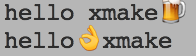 All emoji emoticons, as well as the corresponding keys in xmake, can be found in [emoji](http://www.emoji-cheat-sheet.com/). . Version 2.1.7 supports 24-bit true color output, if the terminal supports it: ```lua import("core.base.colors") if colors.truecolor() then cprint("${255;0;0}hello") cprint("${on;255;0;0}hello${clear} xmake") cprint("${bright 255;0;0 underline}hello") cprint("${bright on;255;0;0 0;255;0}hello${clear} xmake") end ``` Xmake's detection support for truecolor is implemented by the `$COLORTERM` environment variable. If your terminal supports truecolor, you can manually set this environment variable to tell xmake to enable truecolor support. It can be enabled and tested with the following command: ```bash $ export COLORTERM=truecolor $ xmake --version ``` The 2.1.7 version can disable color output with `COLORTERM=nocolor`. ### cprintf #### No line feed color print terminal log This interface is similar to [cprint](#cprint), the difference is that it does not wrap the output. ### format #### Formatting a string If you just want to format the string and don't output it, you can use this interface. This interface is equivalent to the [string.format](#stringformat) interface, just a simplified version of the interface name. ```lua local s = format("hello %s", xmake) ``` ### vformat #### Formatting strings, support for built-in variable escaping This interface is followed by [format](The #format) interface is similar, but adds support for the acquisition and escaping of built-in variables. ```lua local s = vformat("hello %s $(mode) $(arch) $(env PATH)", xmake) ``` ### raise #### Throwing an abort program If you want to interrupt xmake running in custom scripts and plug-in tasks, you can use this interface to throw an exception. If the upper layer does not show the call to [try-catch](#try-catch-finally), xmake will be executed. An error message is displayed. ```lua if (errors) raise(errors) ``` If an exception is thrown in the try block, the error information is captured in catch and finally. See: [try-catch](#try-catch-finally) ### find_packages #### Finding dependencies This interface is a wrapper around the [lib.detect.find_package](/manual/extension_modules?id=detectfind_package) interface and provides lookup support for multiple dependencies, for example: ```lua target("test") set_kind("binary") add_files("src/*.c") on_load(function (target) target:add(find_packages("openssl", "zlib")) end) ``` ### os The system operation module belongs to the built-in module. It can be called directly by the script field without using [import](#import) import. This module is also a native module of lua, and xmake has been extended to provide more practical interfaces.Only some readonly interfaces (for example: `os.getenv`, `os.arch`) in the os module can be used in the description field. Other interfaces can only be used in the script domain, for example: `os.cp`, `os .rm`etc.
| Interface | Description | Supported Versions | | ----------------------------------------------- | -------------------------------------------- | -------- | | [os.cp](#oscp) | Copy files or directories | >= 2.0.1 | | [os.mv](#osmv) | Move Renamed File or Directory | >= 2.0.1 | | [os.rm](#osrm) | Delete files or directory tree | >= 2.0.1 | | [os.trycp](#ostrycp) | Try copying files or directories | >= 2.1.6 | | [os.trymv](#ostrymv) | Try moving the renamed file or directory | >= 2.1.6 | | [os.tryrm](#ostryrm) | Try deleting a file or directory tree | >= 2.1.6 | | [os.cd](#oscd) | Go to the specified directory | >= 2.0.1 | | [os.rmdir](#osrmdir) | Delete Directory Tree | >= 2.0.1 | | [os.mkdir](#osmkdir) | Create the specified directory | >= 2.0.1 | | [os.isdir](#osisdir) | Determine if the directory exists | >= 2.0.1 | | [os.isfile](#osisfile) | Determine if the file exists | >= 2.0.1 | | [os.exists](#osexists) | Determine if a file or directory exists | >= 2.0.1 | | [os.dirs](#osdirs) | Traversing to get all directories under the specified directory | >= 2.0.1 | | [os.files](#osfiles) | Traversing to get all the files in the specified directory | >= 2.0.1 | | [os.filedirs](#osfiledirs) | Traversing to get all files or directories under the specified directory | >= 2.0.1 | | [os.run](#osrun) | Quiet running program | >= 2.0.1 | | [os.runv](#osrunv) | Quiet running program with parameter list | >= 2.1.5 | | [os.exec](#osexec) | Evoke Run Program | >= 2.0.1 | | [os.execv](#osexecv) | Echo running program with parameter list | >= 2.1.5 | | [os.iorun](#osiorun) | Run and get the program output | >= 2.0.1 | | [os.iorunv](#osiorunv) | Run and get the program output with parameter list | >= 2.1.5 | | [os.getenv](#osgetenv) | Get Environment Variables | >= 2.0.1 | | [os.setenv](#ossetenv) | Setting environment variables | >= 2.0.1 | | [os.tmpdir](#ostmpdir) | Get Temp directory path | >= 2.0.1 | | [os.tmpfile](#ostmpfile) | Get Temporary File Path | >= 2.0.1 | | [os.curdir](#oscurdir) | Get current directory path | >= 2.0.1 | | [os.filesize](#osfilesize) | Get File Size | >= 2.1.9 | | [os.scriptdir](#osscriptdir) | Get script directory path | >= 2.0.1 | | [os.programdir](#osprogramdir) | Get xmake install main program script directory | >= 2.1.5 | | [os.projectdir](#osprojectdir) | Get Project Home | |= 2.1.5 | | [os.arch](#osarch) | Get Current System Architecture | >= 2.0.1 | | [os.host](#oshost) | Get Current Host System | >= 2.0.1 | #### os.cp - Copy files or directories The behavior is similar to the `cp` command in the shell, supporting path wildcard matching (using lua pattern matching), support for multi-file copying, and built-in variable support. E.g: ```lua os.cp("$(scriptdir)/*.h", "$(projectdir)/src/test/**.h", "$(buildir)/inc") ``` The above code will: all the header files in the current `xmake.lua` directory, the header files in the project source test directory are all copied to the `$(buildir)` output directory. Among them `$(scriptdir)`, `$(projectdir)` These variables are built-in variables of xmake. For details, see the related documentation of [built-in variables](#built-in variables). The matching patterns in `*.h` and `**.h` are similar to those in [add_files](#targetadd_files), the former is a single-level directory matching, and the latter is a recursive multi-level directory matching. This interface also supports `recursive replication' of directories, for example: ```lua -- Recursively copy the current directory to a temporary directory os.cp("$(curdir)/test/", "$(tmpdir)/test") ```Try to use the `os.cp` interface instead of `os.run("cp ..")`, which will ensure platform consistency and cross-platform build description.
#### os.mv - Move to rename a file or directory Similar to the use of [os.cp](#oscp), it also supports multi-file move operations and pattern matching, for example: ```lua -- Move multiple files to a temporary directory os.mv("$(buildir)/test1","$(buildir)/test2", "$(tmpdir)") -- File movement does not support bulk operations, which is file renaming os.mv("$(buildir)/libtest.a", "$(buildir)/libdemo.a") ``` #### os.rm - Delete files or directory trees Support for recursive deletion of directories, bulk delete operations, and pattern matching and built-in variables, such as: ```lua os.rm("$(buildir)/inc/**.h", "$(buildir)/lib/") ``` #### os.trycp - Try copying files or directories Similar to [os.cp](#oscp), the only difference is that this interface operation will not throw an exception interrupt xmake, but the return value indicates whether the execution is successful. ```lua if os.trycp("file", "dest/file") then end ``` #### os.trymv - Try moving a file or directory Similar to [os.mv](#osmv), the only difference is that this interface operation will not throw an exception interrupt xmake, but the return value indicates whether the execution is successful. ```lua if os.trymv("file", "dest/file") then end ``` #### os.tryrm - Try deleting files or directories Similar to [os.rm](#osrm), the only difference is that this interface operation will not throw an exception interrupt xmake, but the return value indicates whether the execution is successful. ```lua if os.tryrm("file") then end ``` #### os.cd - Enter the specified directory This operation is used for directory switching and also supports built-in variables, but does not support pattern matching and multi-directory processing, for example: ```lua -- Enter the temporary directory os.cd("$(tmpdir)") ``` If you want to leave the previous directory, there are several ways: ```lua -- Enter the parent directory os.cd("..") -- Enter the previous directory, equivalent to: cd - os.cd("-") -- Save the previous directory before entering the directory, then use it to cut back directly after the level local oldir = os.cd("./src") ... os.cd(oldir) ``` #### os.rmdir - delete only the directory If it is not a directory, it cannot be deleted. #### os.mkdir - Create a directory Support for batch creation and built-in variables, such as: ```lua os.mkdir("$(tmpdir)/test", "$(buildir)/inc") ``` #### os.isdir - Determine if it is a directory Return false if the directory does not exist ```lua if os.isdir("src") then -- ... end ``` #### os.isfile - Determine if it is a file Return false if the file does not exist ```lua if os.isfile("$(buildir)/libxxx.a") then -- ... end ``` #### os.exists - Determine if a file or directory exists Return false if the file or directory does not exist ```lua -- Judging the existence of the directory if os.exists("$(buildir)") then -- ... end -- Judging the existence of the file if os.exists("$(buildir)/libxxx.a") then -- ... end ``` #### os.dirs - Traverse to get all the directories under the specified directory Supports pattern matching in [add_files](#targetadd_files), supports recursive and non-recursive mode traversal, and returns a table array. If not, returns an empty array, for example: ```lua -- Recursive traversal to get all subdirectories for _, dir in ipairs(os.dirs("$(buildir)/inc/**")) do print(dir) end ``` #### os.files - Traverse to get all the files in the specified directory Supports pattern matching in [add_files](#targetadd_files), supports recursive and non-recursive mode traversal, and returns a table array. If not, returns an empty array, for example: ```lua -- Non-recursive traversal to get all child files for _, filepath in ipairs(os.files("$(buildir)/inc/*.h")) do print(filepath) end ``` #### os.filedirs - Traverse to get all files and directories under the specified directory Supports pattern matching in [add_files](#targetadd_files), supports recursive and non-recursive mode traversal, and returns a table array. If not, returns an empty array, for example: ```lua -- Recursive traversal to get all child files and directories for _, filedir in ipairs(os.filedirs("$(buildir)/**")) do print(filedir) end ``` #### os.run - Quietly running native shell commands Used to execute third-party shell commands, but will not echo the output, only after the error, highlight the error message. This interface supports parameter formatting and built-in variables such as: ```lua -- Formatted parameters passed in os.run("echo hello %s!", "xmake") -- List build directory files os.run("ls -l $(buildir)") ```
Using this interface to execute shell commands can easily reduce the cross-platform build. For `os.run("cp ..")`, try to use `os.cp` instead.
If you must use this interface to run the shell program, please use the [config.plat](#config-plat) interface to determine the platform support.