
diff options
Diffstat (limited to 'zh')
| -rw-r--r-- | zh/README.md | 12 | ||||
| -rw-r--r-- | zh/manual.md | 14 |
2 files changed, 13 insertions, 13 deletions
diff --git a/zh/README.md b/zh/README.md index 8c291c06..785635f9 100644 --- a/zh/README.md +++ b/zh/README.md @@ -5,8 +5,8 @@ search: zh <p> <div align="center"> - <a href="http://xmake.io/cn"> - <img width="200" heigth="200" src="http://tboox.org/static/img/xmake/logo256c.png"> + <a href="https://xmake.io/cn"> + <img width="200" heigth="200" src="https://tboox.org/static/img/xmake/logo256c.png"> </a> <h1>xmake</h1> @@ -41,7 +41,7 @@ search: zh <a href="https://jq.qq.com/?_wv=1027&k=5hpwWFv"> <img src="https://img.shields.io/badge/chat-on%20QQ-ff69b4.svg?style=flat-square" alt="QQ" /> </a> - <a href="http://xmake.io/pages/donation.html#donate"> + <a href="https://xmake.io/pages/donation.html#donate"> <img src="https://img.shields.io/badge/donate-us-orange.svg?style=flat-square" alt="Donate" /> </a> </div> @@ -1034,7 +1034,7 @@ $ xmake package -o ../test/packages 这样,test工程就可以通过[add_packages](https://xmake.io/#/zh/manual?id=targetadd_packages)和[add_packagedirs](https://xmake.io/#/zh/manual?id=add_packagedirs)去配置和使用tbox.pkg包了。 -关于内置包的详细描述,还可以参考下相关文章,这里面有详细介绍:[依赖包的添加和自动检测机制](http://tboox.org/cn/2016/08/06/add-package-and-autocheck/) +关于内置包的详细描述,还可以参考下相关文章,这里面有详细介绍:[依赖包的添加和自动检测机制](https://tboox.org/cn/2016/08/06/add-package-and-autocheck/) #### 系统查找模式 @@ -1179,7 +1179,7 @@ $ xmake ##### 语义版本设置 -xmake的依赖包管理是完全支持语义版本选择的,例如:"~1.6.1",对于语义版本的具体描述见:[http://semver.org/](http://semver.org/) +xmake的依赖包管理是完全支持语义版本选择的,例如:"~1.6.1",对于语义版本的具体描述见:[https://semver.org/](https://semver.org/) 一些语义版本写法: @@ -1579,7 +1579,7 @@ $ xmake run $ xmake f -y ``` -更多相关介绍,请参考文章:[xmake新增智能代码扫描编译模式,无需手写任何make文件](http://tboox.org/cn/2017/01/07/build-without-makefile/) +更多相关介绍,请参考文章:[xmake新增智能代码扫描编译模式,无需手写任何make文件](https://tboox.org/cn/2017/01/07/build-without-makefile/) ## 支持项目 diff --git a/zh/manual.md b/zh/manual.md index 4d53be00..ab35a950 100644 --- a/zh/manual.md +++ b/zh/manual.md @@ -627,7 +627,7 @@ set_config("ld", "g++") ###### 添加需要的依赖包 -xmake的依赖包管理是完全支持语义版本选择的,例如:"~1.6.1",对于语义版本的具体描述见:[http://semver.org/](http://semver.org/) +xmake的依赖包管理是完全支持语义版本选择的,例如:"~1.6.1",对于语义版本的具体描述见:[https://semver.org/](https://semver.org/) 一些语义版本写法: @@ -5538,7 +5538,7 @@ xmake会同时支持这两种写法,内部会去自动智能检测,选择输 显示结果如下: -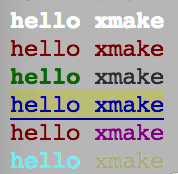 + 跟颜色相关的描述,都放置在 `${ }` 里面,可以同时设置多个不同的属性,例如: @@ -5605,7 +5605,7 @@ xmake会同时支持这两种写法,内部会去自动智能检测,选择输 上面两行代码,我打印了一个homebrew里面经典的啤酒符号,下面那行打印了一个ok的手势符号,是不是很炫哈。。 -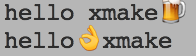 + 所有的emoji表情,以及xmake里面对应的key,都可以通过[emoji符号](http://www.emoji-cheat-sheet.com/)里面找到。。 @@ -6397,7 +6397,7 @@ end ##### table -table属于lua原生提供的模块,对于原生接口使用可以参考:[lua官方文档](http://www.lua.org/manual/5.1/manual.html#5.5) +table属于lua原生提供的模块,对于原生接口使用可以参考:[lua官方文档](https://www.lua.org/manual/5.1/manual.html#5.5) xmake中对其进行了扩展,增加了一些扩展接口: @@ -6485,7 +6485,7 @@ table.slice({1, 2, 3, 4, 5, 6, 7, 8, 9}, 4, 8, 2) ##### string -字符串模块为lua原生自带的模块,具体使用见:[lua官方手册](http://www.lua.org/manual/5.1/manual.html#5.4) +字符串模块为lua原生自带的模块,具体使用见:[lua官方手册](https://www.lua.org/manual/5.1/manual.html#5.4) xmake中对其进行了扩展,增加了一些扩展接口: @@ -6634,7 +6634,7 @@ end ##### coroutine -协程模块是lua原生自带的模块,具使用见:[lua官方手册](http://www.lua.org/manual/5.1/manual.html#5.2) +协程模块是lua原生自带的模块,具使用见:[lua官方手册](https://www.lua.org/manual/5.1/manual.html#5.2) #### 扩展模块 @@ -8331,7 +8331,7 @@ local ok = check_cxsnippets({}, {types = {"wchar_t", "char*"}, includes = "stdio ```lua import("net.http") -http.download("http://xmake.io", "/tmp/index.html") +http.download("https://xmake.io", "/tmp/index.html") ``` ##### privilege.sudo |